This one’s a short one.
I’ve become somewhat fascinated with these ubiquitous but somewhat anonymous Jieli bluetooth audio chips. They pack a surprising amount of extra functionality behind what is nominally just supposed to be a Bluetooth audio SoC series. The tooling behind it is seemingly very mysterious and obscure, though that’s for another time.
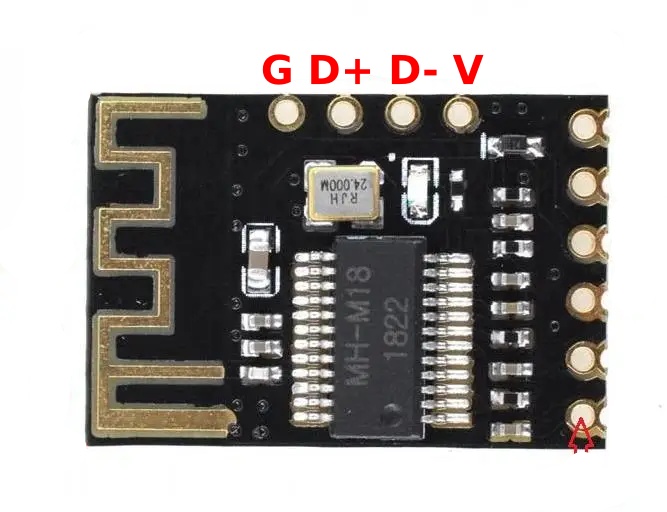
This is about a specific board that is available as a bluetooth reciever module for quite cheap, “MH-M18”, usually sold alongside other boards with connectors attached in listings labeled MH-MX8. The M18 is a simple reciever board, the M28 is a similar board but with a 3.5mm audio and USB power connector onboard, and the M38 is a full-featured bluetooth speaker board with 2 5W amplifier chips on-board - and USB audio functionality, meaning you can plug it into a computer to both power it and output audio, which is what turned me onto this functionality.
I discovered this USB sound card functionality is hiding in most Jieli BT audio chips newer than a certain point. It’s somewhat hard to tell from their labelings, because they use a somewhat obfuscated chip labeling scheme - it’s also not useful to know that scheme, since Aliexpress vendors have taken to etching the IC labels off of a lot of these types of ‘module’ boards, including the example below. More than a few boards have various anonymous four pin headers, including the MH-M18. If you solder a USB connector to the pins in the manner indicated, it’ll act as a USB sound card. I suspect the pin labeled “KEY” is actually the microphone port as well, and the resistor-based control circuitry that is officially recognized on the listings for these boards is just the usual inline media controls, like you find on any cheap earbuds, as a microphone device does indeed show up when plugged into USB.
If you have an Aliexpress bluetooth audio reciever board with a USB port, of any format, even USB-A, try plugging it into your computer, it might just be a sound card too! Even if it doesn’t work, try looking on the underside of the board - there may be a 4 pin header on the underside of the SoC you can solder onto, or some very tiny solder jumpers close to the USB port you have to bridge in order to enable this functionality. It’s usually on boards advertised to be “Bluetooth 5.0”. The MH-M18 boards are honestly not a bad option as a basis for some PC audio projects. I’d recommend them, I’m actually very satisfied with the audio quality - it’s better than most USB sound cards / USB-C audio dongles I’ve got, in terms of noise and general quality.